Manage tasks
Tasks live inside a vault and keep follow-up work close to the decision and evidence that created it.
Read the board
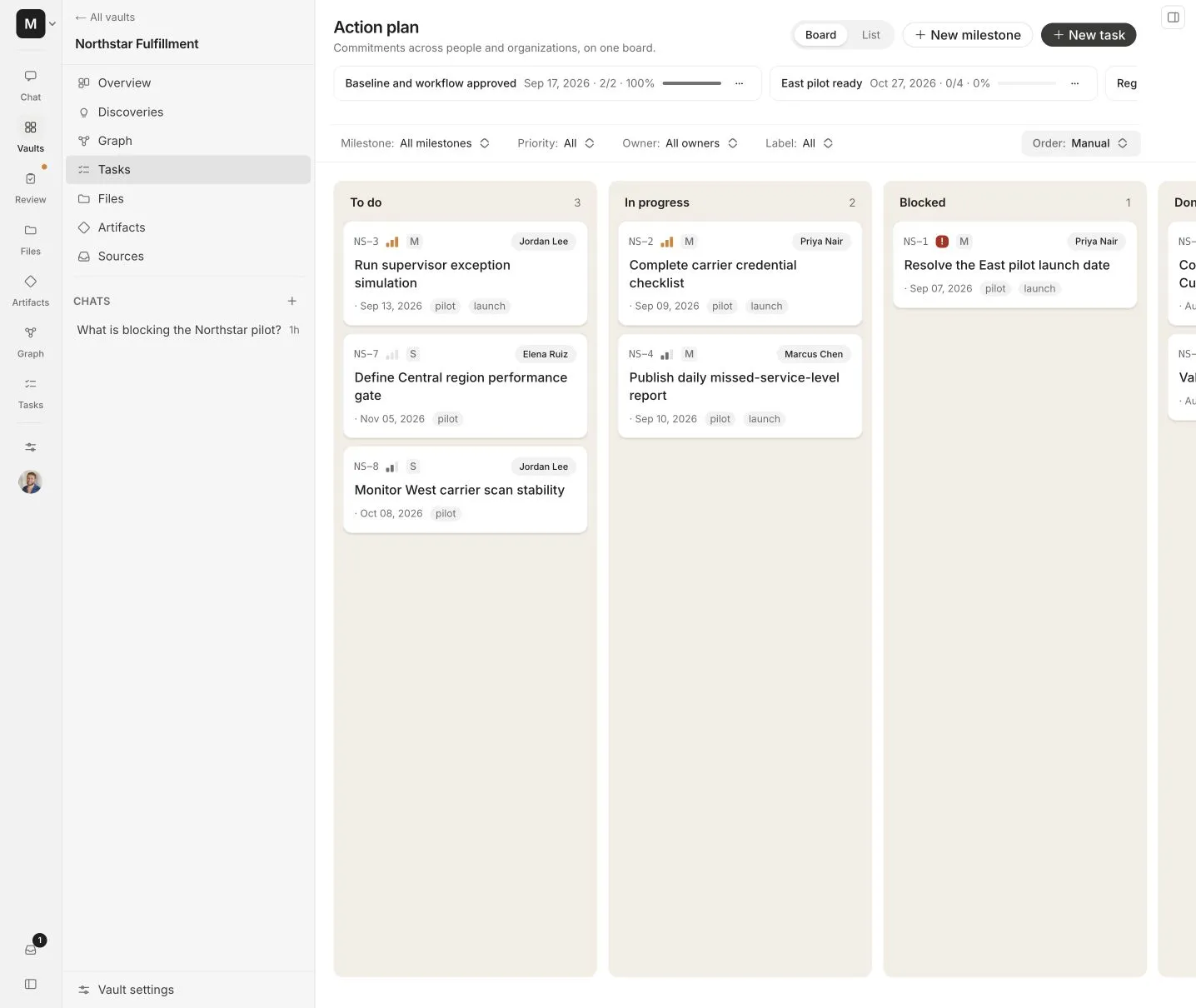
The board groups work into To do, In progress, Blocked, and Done. Use the controls to filter by milestone, owner, priority, or status.
Each task can include:
- A vault-specific identifier such as
NS-1 - A clear action and description
- An owner
- Priority and due date
- An estimate
- A checklist
- A milestone
- A link to supporting evidence
Task identifiers
Every vault has its own board prefix. Alpha suggests one from the vault name, and a vault manager can change it in Vault settings.
The prefix must be 2 to 8 letters or numbers, begin with a letter, and remain unique inside the organization. It is not hardcoded to a particular client.
Add a task from chat
Ask Alpha to create a task only after the action is clear. A good request names the vault, outcome, owner, and deadline.
In Northstar Fulfillment, create a high-priority task for Priya to complete the carrier credential checklist by September 10.
Review the generated title, owner, and date before relying on the task. Alpha should use the person’s name or configured company name instead of ambiguous “us” and “them” labels.
Add a task manually
Use New task when you already know the work. Keep the title short and put the reason, definition of done, and source in the description.
Organize milestones
Milestones group related tasks around a release, client outcome, or phase. Use them for a finite result such as Pilot launch, not as a permanent department label.
Keep the board useful
- Use one action per task.
- Assign a real person when ownership is known.
- Record the source and reason in the description.
- Add a due date only when it represents a real commitment.
- Move blocked work into Blocked and explain what it needs.
- Close or revise old tasks when newer evidence changes the plan.
- Review overdue and unassigned work regularly.
Permissions
Task reads follow vault access. Creating or changing tasks through Alpha, the API, or MCP requires a credential and vault role that allow the write.