Route work into vaults
Routing determines where new mail, meetings, chat, and files land. Treat it as an access and data-quality decision, not a search preference.
Mail and calendar rules
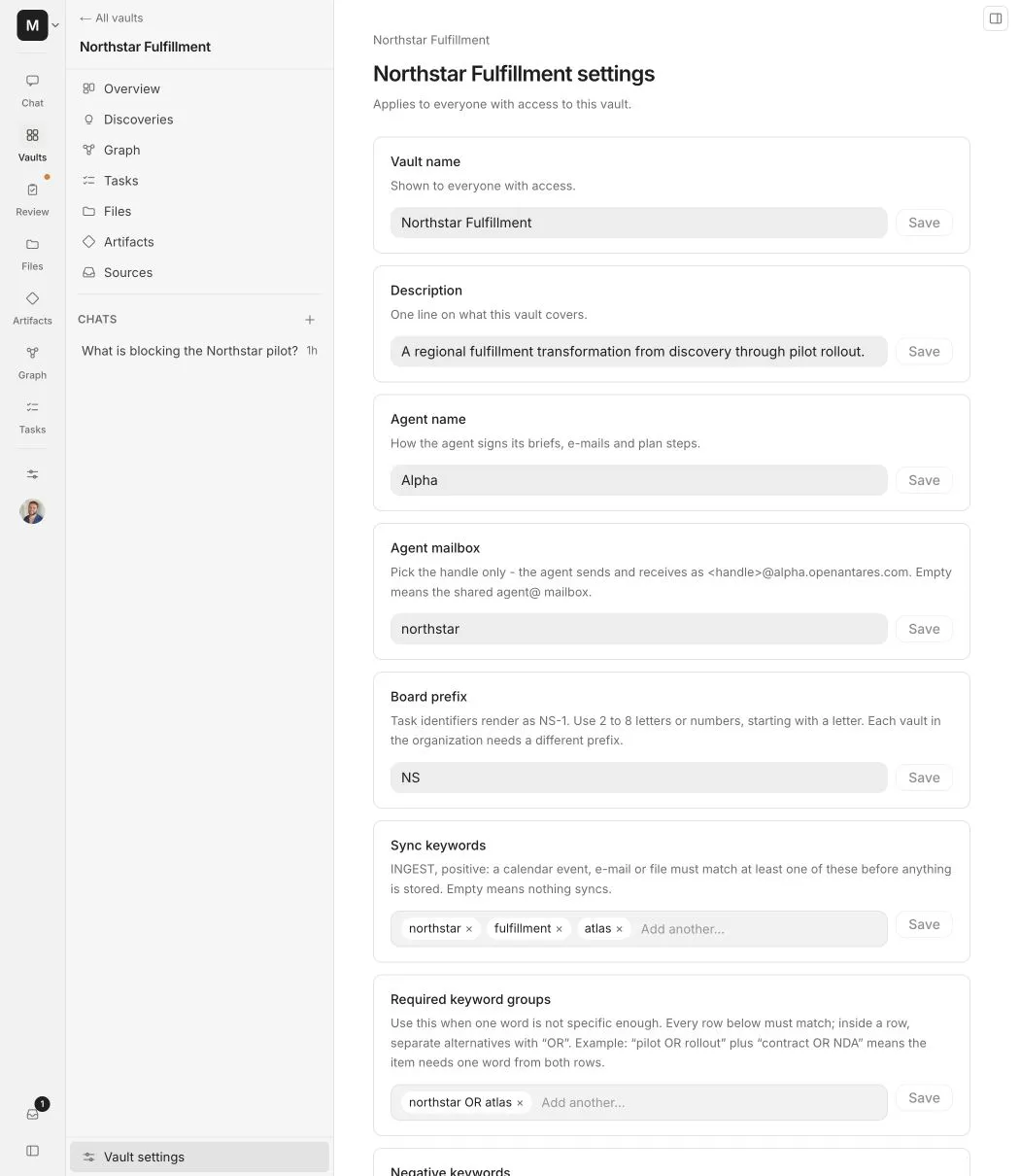
Alpha evaluates the subject, participants, available body text, indexed notes, and configured domains. Use the smallest clear set of rules that describes the client or project.
Evaluation order
Alpha evaluates a source in a predictable order:
- A blocked domain or negative keyword rejects the source.
- Every required keyword group must match when groups are configured.
- Positive keywords and allowed domains establish that the source belongs to the vault.
- Participant strictness decides whether one allowed person is enough or every participant must be allowed.
- If several vaults match, Alpha applies the safest eligible destination and surfaces unresolved material for review rather than silently crossing a boundary.
Exclusions are always stronger than inclusions. Counterparty and team domains add context but do not import a source by themselves.
Rules added by a regular member apply only to data from that member’s connected accounts. A vault admin can review those additions and promote selected rules to the whole vault.
Drive
Drive search checks indexed file text, names, metadata, and folder names across My Drive and shared drives. Results are grouped by folder.
- Selecting a folder includes its current matching contents and watches for new files added later.
- Selecting a single file includes only that file.
- A result is not imported until you select it, choose a destination vault, and apply the selection.
Teams and Slack
Teams and Slack use exact conversation selection. They do not use vault keywords as a substitute for choosing a conversation.
- Choose each Teams chat or channel and assign it to one vault.
- Choose public Slack channels and DMs from the picker.
- Invite Alpha from inside a private Slack channel before it can appear in the picker.
- A public Slack channel can be joined after the current Slack install grants
channels:join.
Ambiguous internal meetings
For a consulting organization, an internal meeting that discusses several clients stays in the internal vault. For a standard user without a dedicated internal vault, it falls back to the user’s private vault. Alpha then notifies the user so they can improve the rules or move the source deliberately.
Never copy a multi-client internal meeting into several client vaults automatically. That creates a confidentiality risk and makes later answers harder to trust.
Correct a route
If a source lands in the wrong place, inspect which rule matched before editing the configuration.
- Move or remove the incorrectly routed source.
- Add a negative keyword, blocked domain, or required group that explains the mistake.
- Confirm the intended vault still has a positive way to match.
- Replay the source and verify its final destination.
When nothing safely matches, a consulting organization’s multi-client internal meeting stays in its internal vault. For a standard user without a dedicated internal vault, Alpha places it in the user’s private vault and creates a notification so the user can improve the rule set.
See Vault settings for every routing field and its surrounding access controls.