
Vault settings
A vault is both a knowledge workspace and an access boundary. Vault managers can open Vault settings to define its identity, routing rules, sources, members, agent context, task numbering, and lifecycle.
Basic information
Give the vault enough context that a person and Alpha can distinguish it from similar work.
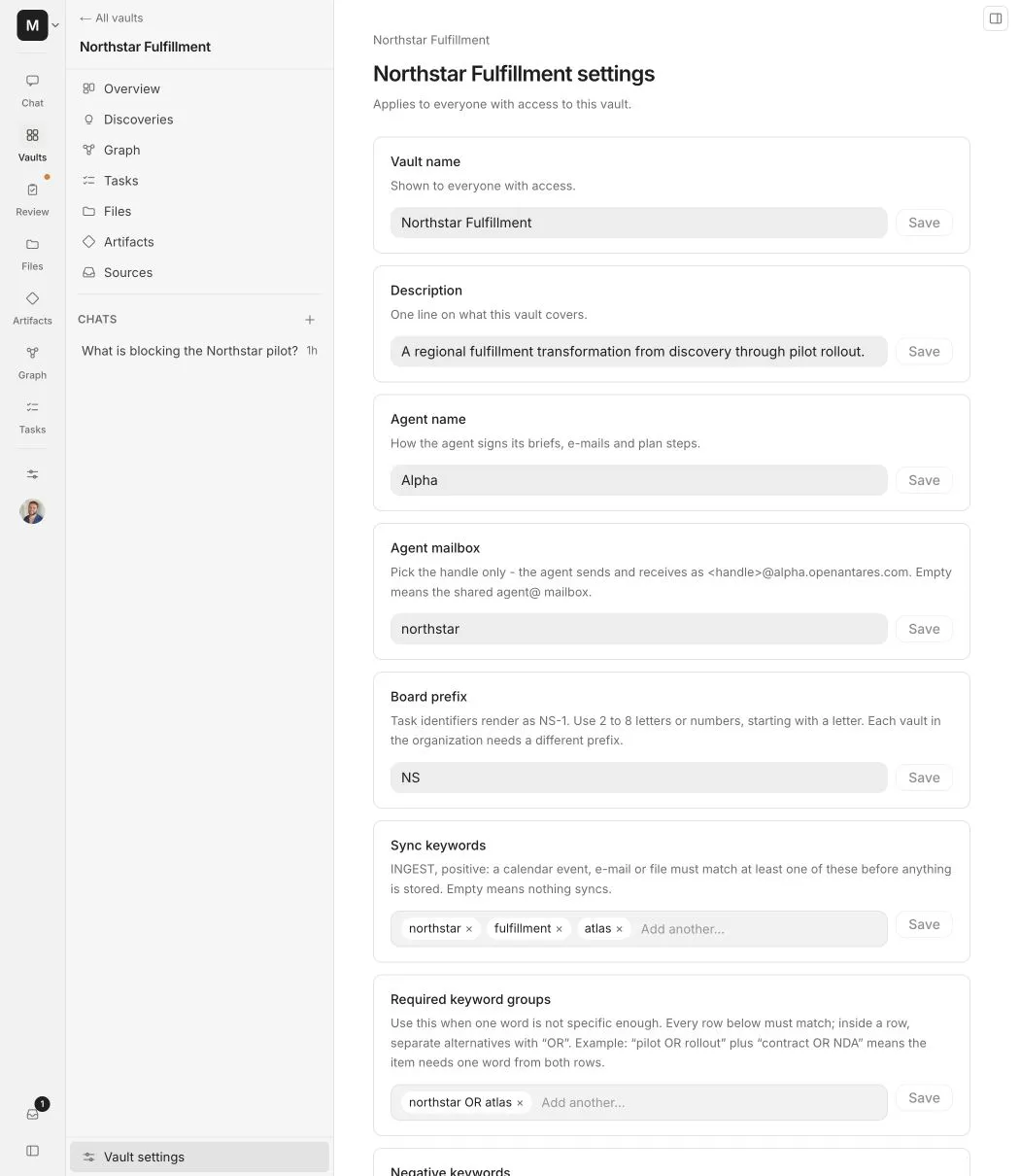
The board prefix must start with a letter, contain only letters and numbers, and be unique inside the organization. Alpha suggests a prefix from the vault name, but a vault manager can change it before the identifier is used elsewhere.
Routing
Routing decides whether mail and calendar records are eligible for the vault.
Positive keywords
Add client names, project codes, product names, and recurring terms. An empty positive rule set means that account-routed mail and meetings do not enter the vault.
Required keyword groups
Use required groups when one broad word is not safe enough. Alpha requires at least one term from every row, while terms inside the same row act as alternatives.
For example:
The source must match the client group and the workstream group.
Negative keywords
Negative keywords reject a source even when a positive rule matches. Use them for recurring false positives, unrelated products, or another client with a similar name.
Allowed sender domains
Allowed domains match people participating in an email or meeting. Choose the strictness that fits the vault:
- Anyone on list accepts a source when at least one participant uses an allowed domain. This is useful for a client vault.
- Everyone on list accepts only when every participant uses an allowed domain. This is useful for an internal company vault.
Blocked sender domains
A blocked domain is a veto. It wins over positive keywords and allowed domains.
Counterparty and team domains
Counterparty domains help Alpha explain which organizations appear in the vault. They do not import data by themselves.
Your team’s domains help Alpha understand internal ownership, task language, and participant roles. They are context, not an automatic permission grant.
Circleback tags
Circleback tags route meetings intentionally sent to the vault. If tags exist, a meeting that does not match remains quarantined for review. If the list is empty, the vault accepts records intentionally sent to its Circleback webhook.
Member additions
Rules added by a regular member apply only to source material from that member’s connected accounts. Vault managers can review these additions and promote selected keywords or domains so they apply to everyone.
This separation lets a member improve their own inbox routing without silently changing another person’s imports.
Agent context
Agent context is a standing description that Alpha should know whenever it works inside the vault. Use it for stable facts such as:
- The purpose and current phase of the engagement
- Team names and client terminology
- Important constraints or decision standards
- What the vault intentionally excludes
Do not use agent context to store secrets or a temporary status update. Source-backed facts should still come from imported evidence.
Sources
The sources section separates shared vault sources from member-owned account connections.
Vault-owned sources
A vault manager can connect sources intended for the whole vault, including supported Google, Microsoft, Linear, ClickUp, and Circleback integrations. These are managed as shared vault infrastructure.
Member integrations
Member integrations show which platforms people connected and pointed at this vault. The per-vault Include control determines whether that member connection may continue feeding the vault.
Turning off inclusion stops future routing from that connection into this vault. It does not delete material already imported.
Quarantined meetings
When Circleback tags are configured, unmatched meetings wait in quarantine. A vault manager can inspect and approve the correct destination or delete the item.
Members
The Members section shows who can open the vault and their vault role.
- A Member can use vault knowledge and permitted features.
- A Vault manager can change routing, sources, members, review work, and settings.
- Organization admins implicitly have access to every organization vault.
Removing a person from this list revokes this vault only. Remove them from the organization settings when they should lose the whole workspace.
Daily processing costs
The daily cost view summarizes the previous 14 days by processing category. Use it to spot a repeated source, unusually large import, or expensive workflow before changing organization-wide limits.
Merge a vault
Merge moves content from this vault into another vault you manage, resolves identifier collisions, then archives the source vault.
Before confirming:
- Review the preview counts.
- Confirm the target is the same client or project boundary.
- Check task prefix and naming collisions.
- Type the current vault name to authorize the move.
Do not merge unrelated clients to simplify navigation. A merge changes the boundary applied to all moved source material and generated knowledge.
Archive or restore
Archiving stops sources from feeding the vault. Chat and artifacts become read-only, while the stored content remains available to people who retain access.
Restore the vault when work resumes. Review its routing and source permissions before starting another ingestion run.